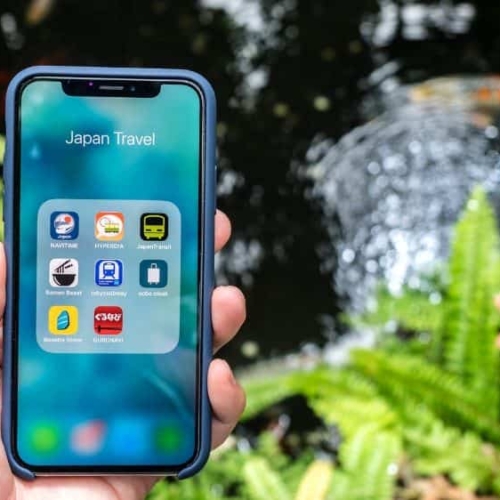
Planning a trip to Japan? The right apps can turn a confusing journey into a smooth adventure. This guide to the best apps for Japan travel covers everything from navigating train systems to translating menus, finding great food, and managing your budget—helping you explore with confidence whether it’s your first or fifth visit.
Japan is a feast for the senses, but it can also be overwhelming. These Japan travel apps make it easy to get around, understand what you’re seeing, and make the most of every moment. From knowing the best train car to take, to scanning a product for instant English info, they’ll help you focus less on logistics and more on the experience.
In This Article
The Best Apps For Japan Travel

As technology has evolved, so have the apps that are on our smartphones. Here are a collection of apps that we always make sure are loaded on my phone before we start our trip to Japan.
1. Google Maps

Let’s start with the most obvious here. Map apps are going to be one of the most critical ones to keep you from getting lost. You’ll use it to find places you want to go and you can use it to navigate as well.
On our first trip to Japan we was skeptical about how good this would be but in most cases, I’d say we defaulted to Google as one does.
You can pretty much find anything you’re looking for on Google Maps and with its handy Save feature where you can drop pins on places that you want to visit. This is something we do for almost every trip and part of my trip planning process.
Google Maps is also surprisingly good when it comes to providing train navigation instructions with accurate timing. Something we actually made use of on recent trips are when it makes recommendations for which train cars to take as well in order to be closer to the escalator.
Offline wise, Google Maps is fully capable but with drawbacks. You can easily do the “OK Maps” technique of saving maps offline or you can go into the “Offline maps” section of the menu.
However, the issue is that if you pull up your offline map when you’re out of range of data, your pins don’t show up and that can get pretty annoying if you don’t have a Japan eSIM or a hotspot such as Skyroam.
Get your eSIM
If you’re headed to Japan, get set up with an eSIM before you go so you that you can hit the ground running.
Another nifty feature of Google Maps is that you can create your own custom maps (called My Maps) which you’ll see me use on all of my itineraries and guides including the top ramen shops in Tokyo and best places to eat in Tokyo. I love them because you can copy them from folks like me and then tweak it to your liking in terms of adding custom icons, colours, and layers. The only problem with this feature is that again, you need data to access it. Even if you have offline maps saved, it won’t let you load it unless you have data.
TIPS: If you’re going to travel without data and you want to use Google Maps with your pins intact (custom maps or otherwise), make sure you have the Google Maps open while you have wifi and make sure you keep the map alive throughout the day.
WHAT YOU NEED TO KNOW
Pros:
- Easy to use and most are comfortable with the interface
- Navigation capabilities are very good in Japan
- Access to the large pool of data that’s on Google (point of interest information such as hours, website, pictures, reviews)
Cons:
- Has limitations when it comes to offline use
Offline Capability: Yes but no access to pins or My Maps without data
Price: Free
2. Payke

This is a new app that’s taken the Japan travel space by storm. Payke is a shopping app at its core but what it’s most useful for is its barcode scanning capabilities.
Have you ever gone shopping in Japan and wondered “what the heck is this?”. Payke is the magical app that solves this.
Here’s how it works. All you have to do is open up the app, hit the scan button, and for (almost) any Japanese product, you can scan the code to get not only English translations but also additional descriptions of the product.
But wait there’s more! The app also has access to coupons at your favourite stores such as Don Quijote, Bic Camera, GU, Matsumoto Kiyoshi, and more. These are similar to the coupons that we offer for our Insiders (see form below) but they have this built into the app
We’ve tested it and you can definitely download it from the iOS store in Canada but we’ve heard some feedback that it’s not available for download for those on the Europe iOS store. If you’re having trouble, please let us know!
WHAT YOU NEED TO KNOW
Pros:
- English-based app.
- Barcode scanning app is way easier than using Google Translate’s camera feature to try to decipher product information.
- Has additional features such as being able to buy their own eSIM.
Cons:
- Not all products are indexed so you might have issues with some products like medicine.
- It does have a Tabelog “feature” but it simply just opens a browser window.
Offline Capability: Limited but you can download the coupons onto your Photos album on your phone.
Price: Free
3. Maps.me

On the topic of maps, Maps.me is an app that we’re going to more and more and here’s why.
Maps.me is an offline map juggernaut and while we can’t say it’s a replacement for Google Maps, we use it to complement it in situations where we know we might have a gap in cellular data.
That is why when we plan our trips, we make sure that the pins that we added on Google Maps also appear on Maps.me. There’s a fairly simple process of doing it but if you don’t know how, make sure to read my guide on how to import your custom Google Maps into Maps.me.
The advantage of the Maps.me app is that once you download the areas of interest, you’ll have access to the maps, points of interests that are built-in, and of course any custom pins/bookmarks that you create.
WHAT YOU NEED TO KNOW
Pros:
- Has very rich offline capabilities
- Bookmarking features are handy and luckily you can import them from your Google My Maps
- Surprisingly a high number of points of interests for their small offline map sizes which means you can actually search for places offline
- Tracks GPS location as you would expect
Cons:
- Does not have navigation capabilities
- Takes awhile to learn the app if you’re a first-time user
- Point of interest lacks rich data that Google has
Offline Capability: Yes but no access to pins or My Maps without data
Price: Free
4. Japan Travel by NAVITIME

This is another essential app to have for anyone that’s spending time in Japan’s capital, Tokyo. If you’ve read my how to get around in Tokyo guide, you’ll know how complex transit is in the city because of all the different companies, lines, ways to pay and so much more.
NaviTime is a comprehensive app that has everything you need to know about not only Tokyo’s transportation network but also the rest of the country. It also includes the following:
- Offline search for free WiFi spots
- Navigation directions to get from point A to B
- Voice navigation
- Train stop list which helps with knowing you’ve gotten on train that’s going in the right direction
- Train delays
- Recent routes are saved offline
If you’re using this to plan your train routes, another handy thing is knowing what platform you need to be on which is especially useful in big cities such as Tokyo and Osaka.
The app has also expanded beyond just transit as it also has built in guides for events, shopping, nature, nightlife, art & culture, and food & drink. It also has itineraries and coupons as well which can be helpful.
One thing you should be mindful of is that to use most of the functionalities you will need data so make sure you grab a SIM card ahead of time or a pocket wi-fi device.
WHAT YOU NEED TO KNOW
Pros:
- You could say this is a more full fleshed out app compared to HyperDia
- Detailed schedule of trains in Japan and optimal routing
- Useful for those that are travelling with the JR Pass
- Provides tons of valuable travel information including duration and cost
- Access to travel guides and articles
Cons:
- The searches by JR Pass can be limiting because it can exclude some obvious connectors that will require cash payment and instead ask you to walk instead which may not be ideal
- There are some complaints about battery life on Android
- No real offline capability
Offline Capability: No
Price: Free (searching alternate routes based on disruptions or voice searching are paid features)
5. Mapway

If you’re spending a lot of time in Tokyo, we’ve found that it’s always best to have an app dedicated to the map because their lines are just that complicated.
Now yes, you could take a screenshot of the map but you wouldn’t be able to zoom in to try to figure out where you need to transfer and you also wouldn’t be able to search specific stop names. With an app like this, you can pull it up and even if you don’t have data (i.e. certain parts of the subway), you’ll be able to quickly reference the Tokyo Metro and Toei subway lines.
There’s not much to say about it other than the fact that it’s basic, easy to use, and for me is all about seeing the subway system lines so I can quickly figure out how to get to where I need to go.
This app used to be Tokyo only but they’ve also added many other cities around the world so this just might be an app that you keep beyond your trip to Japan.
WHAT YOU NEED TO KNOW
Pros:
- Offline map of Tokyo including Tokyo Metro and Toei lines. You can also pull up the original Tokyo Metro map and JR regional Rail map (neither are interactive).
- Ability to search for stations.
- Ability to shortcut (favorite) stations.
- Navigation between stations.
Cons:
- The digital map doesn’t exactly mirror the traditional subway map so sometimes we’ve found it a bit harder to read.
- The navigation feature is very basic and doesn’t factor in time-of-day. For better recommendations, we still suggest Google Maps.
Offline Capability: Yes but only for the map and not for navigation purposes
Price: Free (with ads).
6. Japan Transit Planner

This is another transit app that is often raved by locals that live in Japan. The original Jorudan app was packed with features but since there was never any English built in, they finally created a stand-alone app called Japan Transit Planner.
Much of this is mirrored by the desktop version of Japan Transit Planner which we’ve always found useful. That said, we do find that the capabilities here are somewhat duplicated by Japan Travel by NAVITIME. Both have access to accurate data so the route suggestions are excellent.
Similar to the other navigation apps on the list so far, it does routing for trains so you can filter out routes that aren’t covered by the JR Pass, pick reserved seats, find out how much each option costs, and which takes the least amount of time. I also like that this one has capabilities to search by station to see what lines run through and their individual schedules.
This app also has information about flights as well if that’s an option that makes sense for your journey.
What it doesn’t have are any maps or any offline capabilities.
WHAT YOU NEED TO KNOW
Pros:
- Easy to use and clean interface.
- Allows you to find the fastest route and tells you which ones are easy to help you decide.
- Includes ticket pricing whether using a ticket or IC card which is helpful.
- Useful filtering options for Japan Rail Pass, Tokyo Subway Ticket, and sort order preferences.
Cons:
- No offline functionality.
Offline Capability: No
Price: Free but there is a subscription available that removes ads, path/timetable history, customized search criteria, and optimal boarding position.
7. Google Translate

So far we’ve been focusing on navigation and that’s super important because the worst feeling is getting lost in a brand new country. The second thing that you’ll encounter is the language barrier. While you might not have any experience in Japanese at all, there are apps like Google Translate that can help along the way.
This is an app that is a must-have for anyone that travels because you can download so many different languages for offline translation. Over the years it has also gotten better and better with new functionality.
Here are a few things that Google Translate is good for:
- Translating from in English to Japanese and either attempting to say it or just showing the characters (flip the phone to landscape mode and it’ll show the words in a giant cue-card format.
- Voice translation (data required) where you can translate something quickly on the fly from English to Japanese or if you hear something in Japanese and want it translated, you can also use this.
- Conversation mode is a feature which we tested when English was very limited on our trip to Shikoku. You basically place the phone on the table and each side speaks in their language and the app will translate it for the other party. I’ll be honest, it’s not the smoothest experience because of how slow it is. Another major problem is that if you take a long pause, it’ll think you’re done speaking.
- Handwriting can be helpful if you see Japanese characters and you’re trying to figure out what it says.
- Camera mode is also useful for translating Japanese to English on the fly by taking your phone’s camera and pointing at the sign that you’re trying to figure out.
- Voice playback to help with pronunciation.
Looking for an alternative? We’ve also heard good things about VoiceTra, an app that is used by many Japanese people in the service industry. You can download it on iOS and Android.
WHAT YOU NEED TO KNOW
Pros:
- Incredibly easy to use and offers multiple ways to translate
- Offline capability is a huge plus
Cons:
- Camera mode is sometimes un-useable as only some of the translations make sense so it is very much hit-or-miss
Offline Capability: Yes but some features may not be available such as any voice feature, Conversation, or Handwriting
Price: Free
8. Mobile Suica/Welcome Suica Mobile
This is a relatively new innovation. Traditionally, physical IC cards have been required to tap in and out of subway and train transit in Japan.
By the company JR East which covers transportation in Tokyo offers an IC card called the Suica. It’s taken them some time to catch up to the age of the smartphone but today, there are several ways that can transform your physical Suica card to a digital format.
- Transfer to Apple or Google wallet – After you purchase a physical Suica card at various train stations (including at the airport), you can convert the card to only work on your phone’s wallet. Warning: You are effectively destroying the physical card and transferring it completely your phone.
- Download the Welcome Suica Mobile – Released on March 6, 2025, this app is only for iOS (for now). You can download the app at home, set up your account, and you’ll get a tourist Suica card that is valid for 180 days. Then you top up the Suica with Apple Pay.
As I mention in the cons below, we’ve been weary to recommend transferring Suica cards to Apple or Google wallet. This is because of a personal incident we’ve had with our own digital card suddenly stop working. After many calls with Apple support and visits to the JR East office at Tokyo Station, each company has pointed at the other and ultimately nobody knew how to access the information about the card itself in order to debug it.
It’s great when it works but if it ever fails, your money is good as gone.
WHAT YOU NEED TO KNOW
Apple/Google Wallet
Pros:
- You no longer need to carry your physical card with you and chances are you’ll always have your phone with you.
- Easy to tap your phone at entry/exit points. You don’t need to open the wallet. Simply put your phone over the tap area and it’ll automatically pull up the card.
Cons:
- Still requires you to buy a Suica card when you arrive.
- Any glitches to the Apple or Google wallet is poorly supported. If something ends up going wrong, neither JR East or Apple/Google really know what to do. This is from personal experience.
Welcome Suica Mobile
Pros:
- You can set this up from the comfort of home.
- Eliminates the need buy a Suica once you arrive.
Cons:
- This only works with the Welcome Suica (created for visitors). Normally this expires in 28 days, the 180 days for the app is a welcome upgrade but it will still deactivate afterwards so you need to make sure you finish spending the money that’s on it before you go.
Offline Capability: No
Download: iOS
Price: Free to download but requires funds to load credit onto the Suica.
9. Ramen Beast

If you’ve read our piece of ramen etiquette that you’re probably breaking or the best ramen restaurants in Tokyo, you’ll know that we did this with the help of local experts from Ramen Beast.
They’re a small team that’s obsessed with finding the best ramen in the country and sharing that passion with the rest of the world. They started off as something web-based but now they have a killer app as well and super handy for anyone that wants to seek out the best bowl of ramen goodness.
It’s truly impressive how much of the country that have covered and especially when you go to hot spots like Tokyo or Osaka, you’ll see the land dotted with red pins. Each listing has photos of the location and food, essential info about the shop, recommended “bowl to crush”, and a description that reads like it was written by a writer for The Hollywood Reporter (which is actually true).
If you’re overwhelmed by the choice, the Ramen Beast app also has lists which are curated collection of ramen shops that will tell you which ones are the best miso style, ones that are open late, or simply the crème de la crème of Tokyo.
WHAT YOU NEED TO KNOW
Pros:
- Slick and modern UI that’s easy to use and navigate
- Has a geo-location function to narrow down by map where you are
- Listings include photos and more importantly, the one bowl you have to order
- Handy lists to help narrow down your choices
Cons:
- No Android version
- No offline capabilities
Offline Capability: No
Download: iOS/not available on Android
Price: Free
10. Rosetta Stone

If you’re super keen on learning Japanese, I’d recommend trying out Rosetta Stone. Yes they still exist! Instead of the boxes you could buy off the shelves of Best Buy, it’s gone fully digital with an app and everything.
We tested the app for the Mandarin edition and we were really impressed with how well put together the curriculum is and its focus on the practical as opposed to the mundane details of grammar. You jump right into conversational pieces that will actually be useful.
With the Rosetta Stone, you can truly learn a new language on the go where all the modules can be done while commuting or waiting at the doctor’s appointment. There are built in audio guides for extended learning, and on top of that, lessons can be saved offline.
Once you learn the basics of Japanese, you won’t feel some of the struggles that are very real in the country where English comprehension is quite limited.
WHAT YOU NEED TO KNOW
Pros:
- Very well-built app that is very conducive to learning a new language
- Offline capability is handy
Cons:
- May not match your learning style
Offline Capability: Yes, lessons can be downloaded offline and is available for 30 days afterwards
Price: The subscription $129.99 USD for 12 months or if you want something shorter $89.99 for 6 months of $49.99 for 3 months but they always offer Rosetta Stone discounts so check them out for savings up to 20% off.
11. Ecbo Cloak

Have you ever had situations in your travels where you’ve needed to check out of your accommodations early and you have this awkward gap of time between catching a bus, plane, or train and you don’t know what to do with your stuff? You either have to carry your luggage with you or you have to find a place to stash it for a couple of hours.
Ecbo Cloak is an app that works similarly to another service I learned about in Taiwan called Lalalocker. Think of it as the Airbnb of storage lockers. In most cities, you’ll have the official storage lockers in train stations, large retail stores, and post offices but what about all of the available space in someone’s store, restaurant, maybe even a hotel offering up their space to non-guests, or even someone’s home?
With Ecbo Cloak, it’ll help you find the luggage storage shops nearby, help you reserve, and pay all through the app. How it works is you reserve your space ahead of time by paying online with your credit card. Storage is charged per day and for most places, it’s 300 JPY for small bags smaller than 45cm long and 600 JPY for anything larger. You can also reserve at rail stations for a flat fee of 800 JPY.
WHAT YOU NEED TO KNOW
Pros:
- Sharing economy at its finest and provides great utility for a common travel issue
- Reasonable prices and all handled within the app to eliminate the hassle of payment outside of the system
- Established trust factor
Cons:
- None
Offline Capability: No
Price: Free to download but fee required for luggage storage
12. Uber

Yes, Uber does work in Japan. We finally got a chance to test it on our latest trip to Japan!
I don’t think we need to explain what Uber does so why don’t I just dive into what situations you’d want to use Uber versus the traditional way of hailing a cab in a city such as Tokyo.
I talk about this same topic when explaining how to apply to the Toyosu Fish Market tuna auction but essentially it works like this. Uber in Tokyo is more like a taxi-hailing app where the same taxis that you’d flag down on the street could be the same ones picking you up by Uber.
Overall, Uber in most cases is going to be more expensive than regular cabs but where there’s a twist in the story is during late night from 10PM to 5AM where there’s usually a 20% surcharge. Uber doesn’t add this in so if you’re out late, Uber may be a good option.
Another thing to consider is when you’re travelling in groups of 5 or more. Most cabs in the city are for a maximum of 4 passengers. Uber allows you to call a van on-the-fly as opposed to waiting around and hoping for a larger van cab to roll by.
WHAT YOU NEED TO KNOW
Pros:
- While less of an issue in Japan, it’s nice to know that you can reach out to someone that speaks English if you do have any issues.
- Reasonable prices and all handled within the app to eliminate the hassle of payment outside of the system.
- Established trust factor.
- Handy at night when traditional taxis charge a 20% surcharge.
- Ability to hail larger vans.
Cons:
- Regular taxis are usually cheaper.
Offline Capability: No
Price: Free to download.
13. Go Taxi
Working as a compliment with Uber is Go Taxi. This is one of the main taxi apps in Japan.
Similar to Uber, you basically enter in a destination and it requests a taxi for you. The advantage of this over hailing one by hand is that you can be selective about specific taxi companies and you can see how much the fare will be ahead of time.
While public transit is incredible in Japan, sometimes it’s just easier to hail a cab because:
- You are travelling with heavy bags/suitcases.
- You are travelling early in the morning or at night when public transit isn’t running yet (see Toyosu Fish Market guide).
- With the help of Go Taxi, you don’t need to interact in Japanese to get to where you want to go.
Similar to Uber, you can also enter in your international credit card on here, which streamlines the payment process.
TIP: One thing to keep in mind with cabs in general in Japan though is that they are usually the same black cabs. When setting a pick up near a train station or busy area where there are many taxis lining up, it may be very difficult to figure out which one is yours. If possible, it’s best to hail a cab in a quieter area so you don’t run into this.
WHAT YOU NEED TO KNOW
Pros:
- In theory, you get access to a wider net of taxis through this as this is used by locals and Uber isn’t necessarily adopted by everyone.
- The app is available in English.
Cons:
- none
Offline Capability: No
Price: Free
14. NHK World-Japan
NHK is like the CNN of Japan. They’re run by the Japan Broadcasting Corporation and covers both domestic and global news. NHK World-Japan is the international arm and aimed to overseas markets.
The NHK World-Japan app presents news in English and 18 other languages.
One use case for the app is to read/stream the latest in news around Asia and Japan. This might be helpful when you’re in the country and trying to see if current events affect your plans, or if you’re wondering if an incident you saw earlier was big enough to make the news.
Another handy feature of the app is that it has push notification of emergency information on earthquakes, tsunami and Weather Emergency Warning in Japan.
If you’re looking for an alternative that just focuses on earth quake warnings, you can try Nerv or Safety Tips (iOS/Android).
WHAT YOU NEED TO KNOW
Pros:
- Get instantly notified of major emergencies such as earthquakes and tsunamis.
- Easily access Japan news in English.
Cons:
- Does not have a Japanese language feature so the app isn’t too useful if you are trying to immerse yourself in the language and trying to learn.
Offline Capability: No
Price: Free
15. Klook
In North America, most people use Viator. In Europe, it’s a toss up between GetYourGuide or Viator. In Asia, Klook dominates the bookable activities space.
Klook is platform that is a massive market place for anything a traveler might need. This includes train tickets, train passes, attractions, activities, tours, car rentals, airport transfers, and more!
Over the years, we’ve used them to buy Shinkansen tickets, rent a car, and special activities. In all cases, I compared them to booking them directly with the company (if possible) and I’ve never seen them charge more. In some cases, they were cheaper.
When in Japan, we always recommend that you check to see what is being offered on Klook because there might be a promotion, or a special offer.
It’s also nice to know that with Klook you have access to their English-speaking customer support to get sorted if you run into issues.
WHAT YOU NEED TO KNOW
Pros:
- One-stop-shop for all things you might want to purchase online ahead of time.
- Easy-to-use platform that works on both the web and through the app.
- The app stores all of your bookings in one place.
- App allows you to quickly search for something you want to book.
Cons:
- The app can be buggy at some times such as when adding reviews from within the app.
Offline Capability: No
Download: Klook App
Price: Free
16. Airalo
There’s a reason why Airalo has taken the eSIM industry by storm and why most travellers choose them when travelling.
For those that don’t know, Airalo is an eSIM provider and have quite affordable plans for Japan and around the world.
The advantage of using an eSIM over getting a physical SIM or using a wifi hotspot is that you can get it set up from the comfort of home, and simply activate it from your phone when after you land.
Airalo’s app is easy to use, manage your usage, and top-up if needed.
WHAT YOU NEED TO KNOW
Pros:
- Great prices on Japan eSIMs.
- Excellent customer service.
- One of the best eSIM apps on the market.
Cons:
- They may not necessarily be the cheapest. At the bottom of our article, we provide suggestions on other companies that you can check out as well.
Offline Capability: No
Download: Airalo for Japan
Price: Free
17. MyMizu
Staying hydrated when you’re in Japan is critical, especially when you’re putting in 20,000 steps a day and/or in the sweltering heat of the summer.
Travelling with a re-useable bottle is an important part of trying to leave as small of a footprint as possible and being environmentally conscious. The challenge in Japan though is finding a place to refill it.
That’s where MyMizu comes in. It’s an app that pinpoints 200,000 locations around the world where you can refill on water. You can also track your impact (how many plastic bottles you’ve saved) and daily water intake as well.
Unique to Japan, they include dark blue points that indicate natural spring water and golden dots for businesses where you can refill your bottle for free.
WHAT YOU NEED TO KNOW
Pros:
- Easy-to-use app.
- Quickly find places to fill up water which typically involve businesses versus refill stations.
Cons:
- None.
Offline Capability: No
Price: Free
18. Wise
For the final app, we have to mention what’s been an absolute game-changer when it comes to spending money in Japan.
If you read any of our travel guides for Japan including our 12 Day Japan Itinerary, you’ll know that cash is still king but in today’s world, it’s much easier to pay by card.
In situations where you can pay by card, the ugly truth of banking is that most credit cards are charging a 2.5% fee that’s embedded into the exchange rate. So while you might not see it upfront, you’re spending more money than you should.
While you could look for a card that doesn’t charge a foreign transaction fee, you might still not be getting the best deal because the rates that they use aren’t the most favorable.
That’s where Wise comes in. Where this bank has built their success around has been getting really good exchange rates. Their card is a prepaid Visa card where you essentially exchange money from your own bank at near-market-rates to Japanese Yen.
Once the Japanese Yen is loaded onto the card, you can tap it in Japan and spend it as Yen so there aren’t any real surprises and you don’t have to deal with the fluctuations of the exchange rate day-to-day.
WHAT YOU NEED TO KNOW
Pros:
- Some of the best exchange rates you’ll find from your home currency to JPY. It is close to the actual market rate.
- No longer have to deal with foreign transaction fees.
- The Visa prepaid card is acceptable in most places around Japan that take card.
- Has both digital and physical cards available.
Cons:
- You do have to pay a small fee during the exchange into JPY but it is quite reasonable and is significantly less than what you’ll lose by using your big bank’s rate.
Offline Capability: No
Download: The app is what you’ll need to manage your funds once everything is set up with Wise.
Price: Free to sign up.
18 Must-Download Apps for Japan Travel
So there you have it! 18 useful, tested, and tried and true apps to have when travelling to Japan. You might not use all of these apps when you’re in the country but they’re always good to have pre-downloaded before you go.
The last tip we’ll share is that you want to make sure you open each one before you leave because they may need to download an internal update or in the case of the map apps, do all the offline downloading ahead of time.
Have a blast in Japan!
Read More about Japan
- Best offline maps app for travel that isn’t Google
- Ultimate Tokyo food guide
- Must-read Japan 12 day itinerary
- Kichijoji street food guide
- What to buy in Japan and where
- Our Japan guide
Where to Stay in Japan?
- Now that’s a loaded question but to get you started, here are a few guides to take a look at. Here are places to stay in Tokyo and where to stay in Kyoto.
Japan Trip Planning Essentials And Discounts
If you’re in the middle of booking your trip to Japan, here are the most important places you need to go to book:
JR Pass
The two most reliable places we always check are JRailPass and JRPass. If you are taking long distance Shinkansen across multiple region, get the full JR Pass. If you’re focusing on one specific area, you only need a JR regional pass. The official booking platform is Smart-Ex.
Shinkansen
The JR Pass prices have gone up and for many of you, it’ll make more sense to book tickets individually. The secret is that when you buy your Shinkansen tickets through Klook offers special vouchers for Don Quijote and BIC when booking. Their tickets are super easy to redeem as well. Right now, use code SKS10OFF to save $10 USD off.
Tours
While Viator and GetYourGuide are our go-to’s, Klook and KKDay are much popular in Asia so it’s always worth comparing across all of them to make sure you get the best price. With Klook, use code GOINGAWESOMEPLACES to save up to 8% for new users and 3% for existing users.
Pocket Wifi

While we do love eSIMs, having a pocket wifi is great for sharing data with a large group. The most popular is NinjaWifi which is easy to pick up at the airport. Use code AWESOME15 to save 15% (automatically applied). Alternatives are offered by JRPass and JRailPass but they aren’t as cheap. For a more global solution, consider Solis and PokeFi.
eSIM
We’ve used both Airalo and Ubigi in Japan. We recommend you read our article on the cheapest eSIMs for travel to find out who’s the best for you.
Car Rental
Big companies such as Budget, Avis, and Enterprise operate in Japan but they’re usually the most expensive. The best companies are the local Japanese ones such as Toyota, Nippon, Orix, Nissan, and Times Car Rental. To make things easier, use Booking’s car rental platform and Klook to compare prices all in one place. Don’t forget, you need an IDP to drive in Japan so get one before you leave your home country.
Learn Japanese
It helps to know even a bit of the language before you go. Start your learning with Rosetta Stone Japanese.
Cash or Credit
Cash is still very important to have in Japan but when you use credit cards, make sure you’re not getting charged those extra exchange rate fees. The best card right now is the Wise Multi-Currency Card which is actually a debit card where you can convert at favorable rates beforehand. This cuts out any sneaky transaction fees.
Travel Insurance
Make sure you’re covered in case something happens. Get quotes from HeyMondo where booking through our link gets you 5% off automatically and if you’re from Canada, get quotes from RATESDOTCA.
Shopping
Discovering Don Quijote is a quintessential part of the Japan experience. The secret for tax-free shopping is that they have a coupon that can help you save 10% off + additional 5% off if you spend ¥10,000 or more. If you’re interested in coupons like this, we have them stored on our Goodies page that Insiders can access. Join today!














Dear editor, please update the listing as some of the apps you are recommending is so outdated that the UI looks like it was made for original nokia.
Those are just how many of the Japanese apps look and are designed. Yes, many of them can be better but we use what we can get when we’re travelling.